
Abstract
A portfolio needs to help a visitor understand a system before they invest time in evaluating its source or deployment. This engineering design study documents a presentation approach used in this portfolio: interactive browser editions, original software screenshots, guided tasks and explicit technical evidence. The public experience is separated from the original operational backends so a visitor can explore without changing a real system.
Research question
What combination of interaction and explanation helps a visitor understand the purpose, workflow and implementation boundaries of a software project?
The question is about the design of an evaluation experience. It does not assume that a simplified browser demo reproduces every feature of the original application.
The project collection
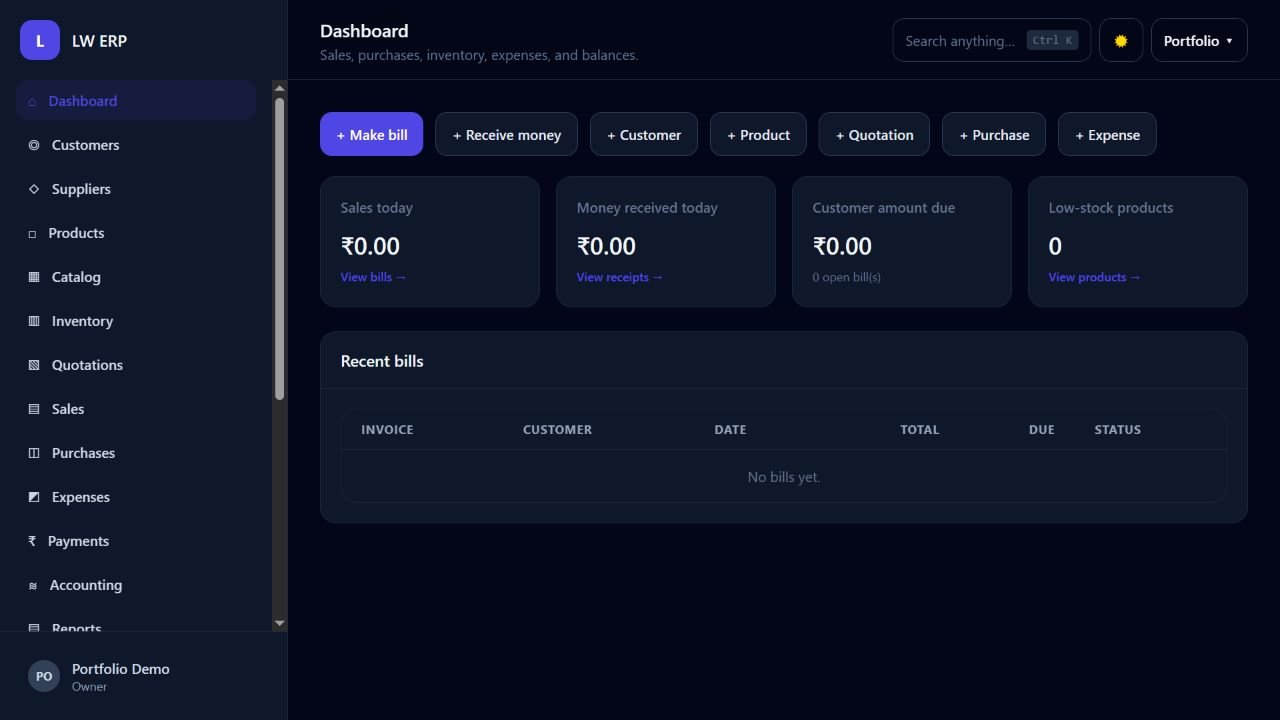
The portfolio contains 21 project entries. Its public demonstrations include 19 browser editions using fictional sample data and two original browser applications. Original UI captures provide another view of the implemented software. Flagship case studies connect selected projects to their problem, architecture, workflow and verified behavior.
Separate the presentation layers
Each layer answers a different question. The project description explains what the system is for. The demo reveals how a workflow behaves. The original gallery shows the richer interface. The architecture diagram exposes responsibilities and relationships. The evidence text identifies what was actually checked.
flowchart TB
    V[Visitor] --> P[Project explanation]
    P --> D[Sample-data demo]
    P --> G[Original UI gallery]
    P --> A[Architecture]
    D --> E[Verified technical evidence]
    G --> E
    A --> E
    E --> B[Contextual project brief]
Interaction should teach a task
A guided task gives the visitor a concrete starting point. LW ERP’s browser tour asks the visitor to add an item, complete a fictional sale and inspect the receipt. QueueCare’s tour follows booking, calling and completing a sample token. ResilienceOps presents policy and approval boundaries before an audit review.
Those tasks make a feature visible without requiring the visitor to understand the entire application at once. Completing a tour demonstrates the browser workflow; it is not evidence that a production deployment has passed every reliability or security requirement.
State the operating boundary
Sample changes stay in the visitor’s browser. The original backend services are not executed by those browser editions. This boundary is visible in the demo interface so the visitor can distinguish an educational interaction from a real order, clinic record or cloud operation.
The original AimForge and CalmSpace browser applications have their own quick guides. Their interactions remain the actual browser tools rather than a server-operation simulation.
Evidence and evaluation
The implementation is checked through original application workflows, browser demo logic, responsive layout checks, public source comparisons and endpoint access checks. These checks establish particular technical behaviors. They do not establish a client testimonial, commercial result or general claim that a system cannot fail.
A useful evaluation record names the environment and the exact behavior observed. The case studies therefore describe original UI captures and verified sample workflows in concrete terms.
Limitations
Browser editions simplify the original systems. A public demo cannot replace a full source review, an accessibility audit of every original screen, a performance study under representative load or a deployment-specific threat assessment. A project adaptation needs its own scope, data migration decisions and acceptance checks.
Implications for client discussions
The visitor can enter a conversation with a shared example. A generated brief carries a known project, the intended workflow, a preferred environment, a timeline and an optional planning budget. This narrows the initial discussion while leaving implementation scope and pricing to an actual agreement.
Further work
Future evaluation could observe how users navigate the collection, which guided tasks clarify the software and where explanations remain confusing. Any published usability results should come from a defined study with recorded observations and participant permission.
Explore the full project collection